
DISPATCH & LOADING VISIBILITY
Dispatch & Loading Visibility
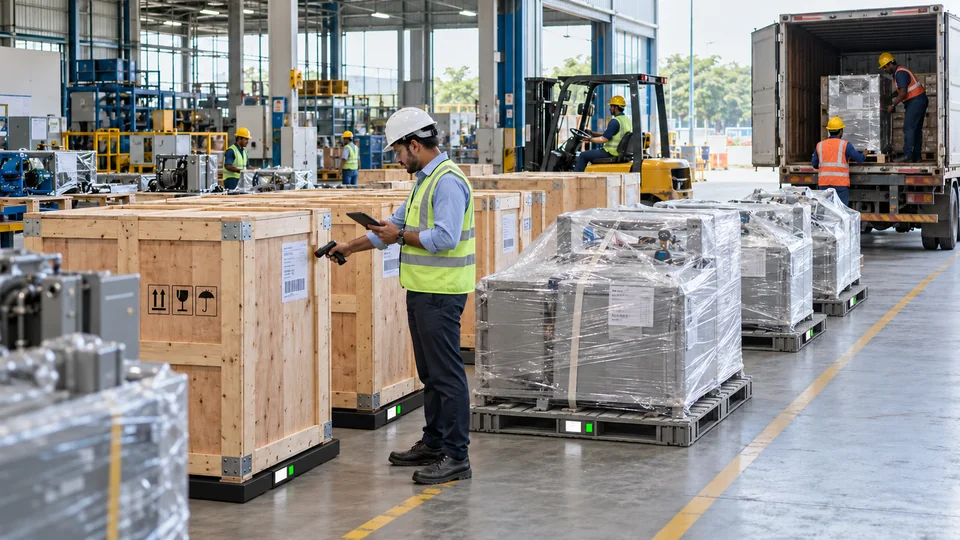
Connect confirmed pallet weight to dispatch orders and the loading plan.
SLIM
Dispatch · Logistics · Warehouse · Planning
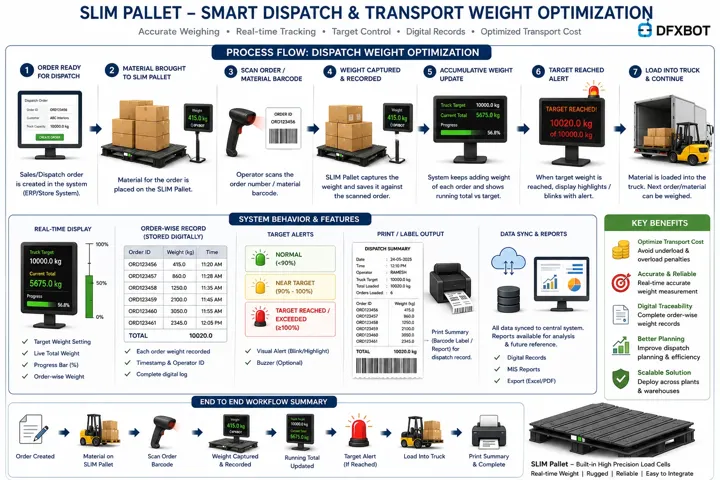
THE WORKING MECHANISM
From physical action
to a useful response.
WHAT YOUR TEAM CAN ACHIEVE
Clarity at the
point of work.
- Order-linked confirmed pallet weight
- Truck-wise loading progress
- Remaining configured capacity indication
- Existing-pallet and multi-order workflow design
WHERE IT FITS
Designed around your material.
- Finished goods and dispatch pallets
- Multi-order loading operations
- Existing pallets and staging points
BRING IT INTO YOUR OPERATION
A realistic setup.
A defined workflow.
Intermediate handling movements and confirmed dispatch events are treated separately. The configured capacity indication supports the loading plan; dimensioning is a separate scope.
Begin with representative material, the current storage arrangement and the business event you want to capture. Agree the operator action, interface and acceptance measures together.
RELATED OPPORTUNITIES
Build the next
connected step.

See current stock by item and location
SLIM measures physical stock in selected bins, crates or pallet locations. See quantity changes and identify locations that need attention.
Explore Real-Time Inventory Visibility ↗

Request replenishment when stock runs low
Use point-of-use stock levels and agreed thresholds to alert the supply team when a location needs refilling.
Explore Digital Kanban & Replenishment ↗
YOUR NEXT CONNECTED WORKFLOW
Let’s bring this into
dispatch & loading visibility.
Share the material, storage arrangement and action you want to connect. We’ll map a practical first application.